I am so excited to be writing my second blog post of the year on this wonderful blog. During my last post, you may remember that I offered to be your "virtual coach". I had several people who were interested in learning more about how to use QR codes in daily routines as well as how to create these cute little things. I decided to provide you with 10 ways to use QR codes in the classroom as well as step by step tutorials to help you get started. At the end of this post, you will find links to all of the resources discussed..
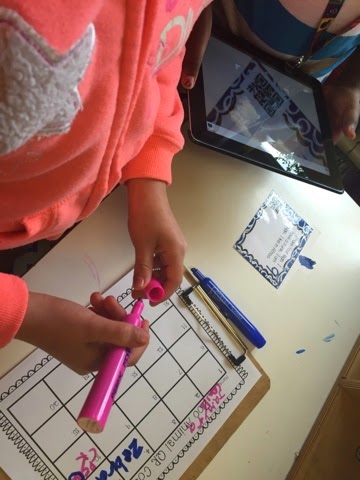
#1 - One of my favorite ways to use QR codes is to assist students in linking to websites for research purposes. Here is a picture of a kindergarten student trying out my American symbol research unit. Each day students learn about a different symbol. The first QR code sends students to images of the symbol to save to their camera roll and the other code sends them to a video to learn more about the symbol. Students then write, draw, or explain what they learned about the symbol by adding the information to their American symbol book using the Book Creator app. While this little unit is not quite ready for public viewing, I do have a butterfly research project that is similar. If you only have one iPad in your classroom, I always provide alternatives for student projects. Rather than creating research booklets using Book Creator, students have a hard copy to write on.

#2 - Another way I have used QR codes in the classroom is by using them for app smashing. During my Me on the Map geography unit, students use QR codes and Google Earth. Students take screenshots from Google Earth and then transfer their pictures to Pic Collage to create a collage that matches the pictures taken to the vocabulary students are learning from the unit. This is a great way to teach vocabulary to students and use multiple apps at the same time. Also known as an app smash.
#3 - Have you ever thought about using QR codes for behavior management? I created a behavior management system for one of my teachers and her students absolutely love it! QR codes are only one part of the system but allowing students to use the iPad can have a huge impact on student behavior and engagement.
#4 - In 21st century classrooms, it is important that we start thinking of ways to save students' online work. There are several ways to create digital portfolios but in the example below students add their best work to their blog. When the QR code is scanned from their display it takes the reader to their homepage with all of their projects.
These are ways that I have used QR codes but I asked teachers on my Facebook pages how they use QR codes in the classroom and here are some of their responses:
#5 - Kimberly said she has her kindergarten kids scan CVC words. Then they have to read/blend and draw a picture of the word. For math, she has her students scan a number and then fill out a 10 frame to match.
#6 - Brittany said she has QR codes in a listening center. Students love to scan the QR code to listen to a story read aloud or watch a short video of the book.
#7 - Deniece uses QR codes for scavenger hunts. Stations are set up around the room that have questions students answer about a specific topic and then scan to find the answer.
#8 - Cassie uses QR codes in her centers for students to find rhyming words and to solve math word problems.
#9 - What about QR codes for mother's day? Jude says she uses them for mother's day presents. Students record a nice video for their moms. What a great gift!
#10 - One really great idea was from one of my model classroom teachers. Amanda suggested creating QR codes to direct administrators to lesson plans rather than having to print them off. She also thought it would be great to provide a QR code that would link to a Google form to allow the administrators to leave feedback of their visit. The feedback would be sent to a spreadsheet that is shared among the administrators and the teacher. Isn't that a great idea?
So there you have it...10 ways to use QR codes in the classroom. However, I know for some of you you are thinking, "The ideas are great but I have no idea how to make this work in the classroom." Well have no fear, I have created how-to videos to help you get started. I found this nifty little tool the other day called Minilogs. I thought it would be a great way to share the videos and resources I have created for using QR codes in the classroom. Just click on the play button to get started.
If after you have read this post, checked out the resources I provided and you still feel you need more assistance, just click on the picture below to let me know what your needs are and I will do what I can to help.
How do you use QR codes in the classroom? I would love to hear other ideas.